
Welcome to RFgen
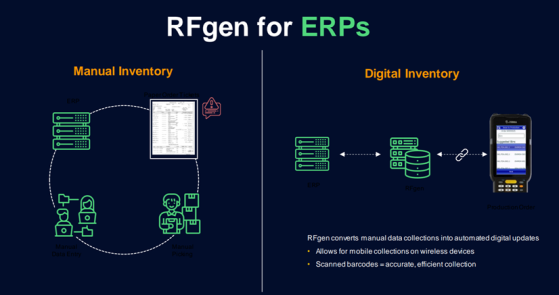
RFgen helps collect barcoded data from mobile devices, convey the digitized data to your ERP system and print barcode labels to label printers.
The basic workflow consists of mobile devices running applications used to scan barcodes and conduct warehouse tasks. When a user completes a task, the data in the transaction is submitted by the user to the RFgen server which in turns conveys the data in the transaction to the Enterprise Resource Planning (ERP) system. If desired, the customer can also use the new RFgen Secure Label feature to design labels, merge data from a specific source of data (database) and mass print barcode label to label printers in the customer's environment. Secure Label requires additional licensing from RFgen.
The major components in the RFgen solution consists of the RFgen server, RFgen client software, the application database (collection of warehouse apps that are installed to the user's devices), and a datasource (i.e. inventory data used in a Cycle Count app, shipping data for a picking app ), and connections to the ERP system.
The Mobile Unity Platform Console (RFgen Server) features: Tools for configuring and administrating RFgen services.
The RFgen Mobile Development Studio features the tools to design, test, and create profiles (the apps and dependent resources) that deploy to RFgen clients in addition to configuring the RFgen server.
The RFgen Client software enables communicate with the RFgen server. Once the connection is made between the client and server, profiles are downloaded to the client. A Thin Client profile enables users to work in near realtime when the client is connected to the RFgen server. A licensed Offline client (also called Batch,Mobile or Fat client) profile enable users to work offline and convey updates to the ERP when the user reconnects with the RFgen server.
The User Management Console is used for assigning menus to groups of users or individuals and linking applications to specific menu items.
The Mobile Enterprise Dashboard provides supervisors/admins the ability monitor connected client sessions and if desired, if needed log into a session to provide help.
The Transaction Management Dashboard lets supervisors/admins view queued, successful and failed submissions to the ERP. If needed it also provides tools to edit and repost failed transactions for reprocessing or view historical submissions.
Additional help resources