
RFgen Client Software
How it works
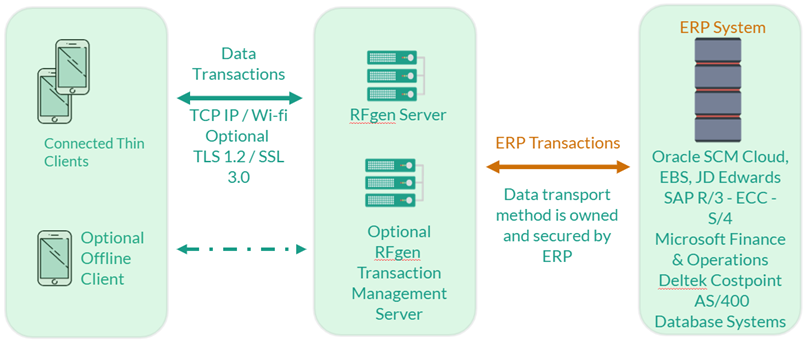
RFgen provides the RFgen client software to enable mobile devices to communicate with the RFgen server. The client software is available from the RFgen Download site, from Google Play, or the Apple App store.
Once the communication between the server and client is established, the RFgen server will deploy the mobile applications that enables your mobile device to perform warehouse tasks.
With the RFgen client software installed, the mobile device is typically set to operate as a thin client. With a thin client, changes are conveyed from the device to the RFgen server and from the RFgen server to the ERP system. For example, if you were changing the location of an item from bin 0001 to bin 4560, the change is conveyed through the application running on the device which is then passed to the RFgen server and from the RFgen server to the ERP.
The other operational mode is offline where you can use the device to conduct tasks while disconnected from the network. This allows you to work offline, but the changes are stored on the device until it reconnects with the RFgen server which in turn conveys the changes to the ERP. This mode is also called "Batch" because its taking batches of jobs (changes within a type of workflow) and saving them up until the information can be passed back to the ERP.